What is a good Shopify speed score, and how to read it
Lighthouse counts 90 and up as good, but the big number is a lab test. What a good score looks like for a Shopify store, and the three numbers to watch instead.

Store owners often send us a screenshot of a red PageSpeed score and ask if the store is broken. Usually it isn't. The big score comes from a lab test on a simulated slow phone, and it moves by a few points every time you run it.
Below is the short answer to what counts as a good score, then how to read the rest of the report.
What is a good Shopify speed score?
On Google's own scale, a Lighthouse performance score of 90 to 100 is good, 50 to 89 needs improvement and 0 to 49 is poor. That's the big number at the top of PageSpeed Insights, and it's the number most apps and agencies quote when they talk about a Shopify speed score.
For a Shopify store I'd set the bar by device. On desktop, a well-built theme should sit in the 90s. On mobile, 90 is a fair target, but it gets hard to hold once a store runs reviews, chat, tracking and a few other apps. If the mobile score is in the orange and the three field metrics further down are green, the store is fine for real shoppers.
Don't chase 100. Google's Lighthouse docs say that going from 99 to 100 takes about as much improvement as going from 90 to 94. That time is better spent on the product page.
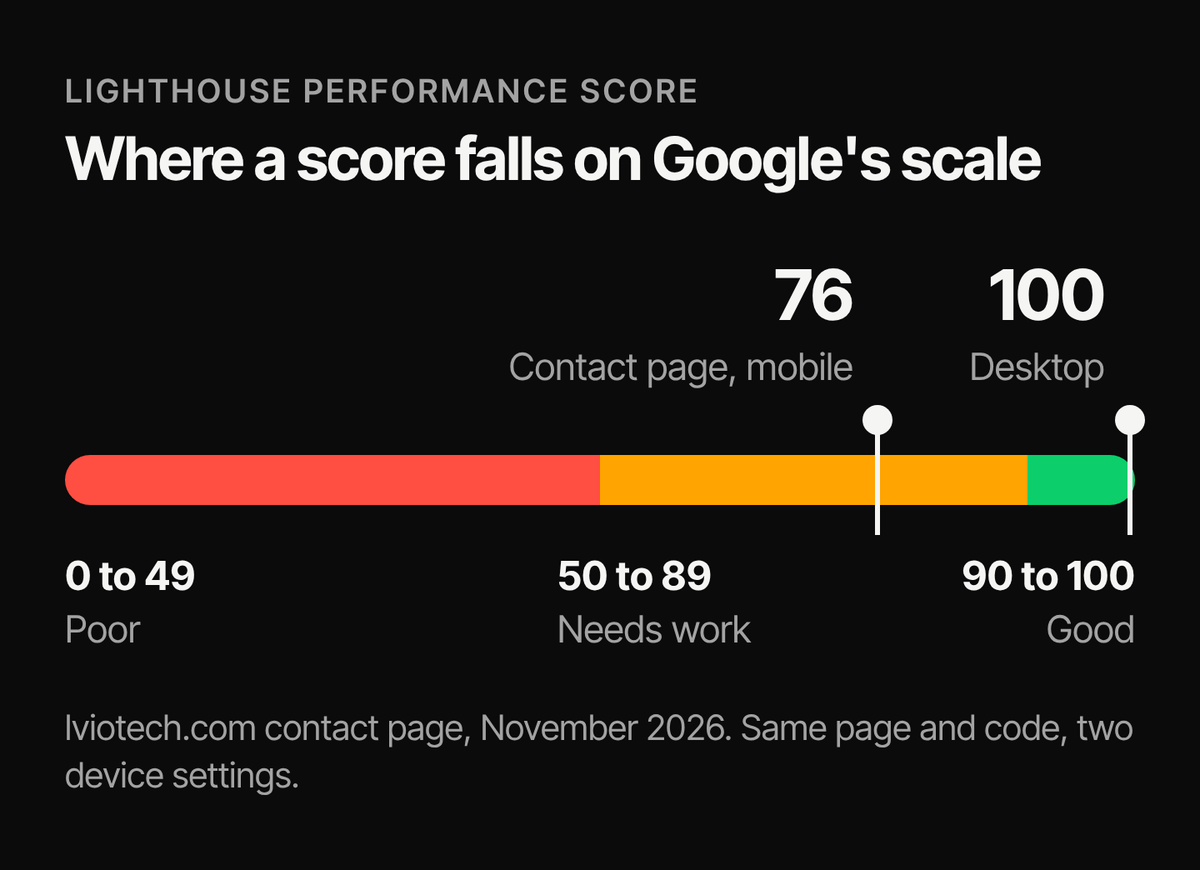
The two marks on that scale are our own contact page, tested in the same week in November 2026: 76 on mobile and 100 on desktop. Same page, same code.
Why is the mobile score so much lower than desktop?
The two tests run under different conditions. The mobile run simulates a mid-range Android phone on a slow 4G connection, with the CPU slowed down on purpose. The desktop run assumes a fast connection and a full-speed processor. Lighthouse also scores desktop results on a separate curve.
So a big gap between mobile and desktop doesn't mean something is broken. Compare mobile with mobile, and desktop with desktop. Most of your shoppers are probably on a phone, which makes the mobile numbers the ones worth working on.
Lab data and field data are different things
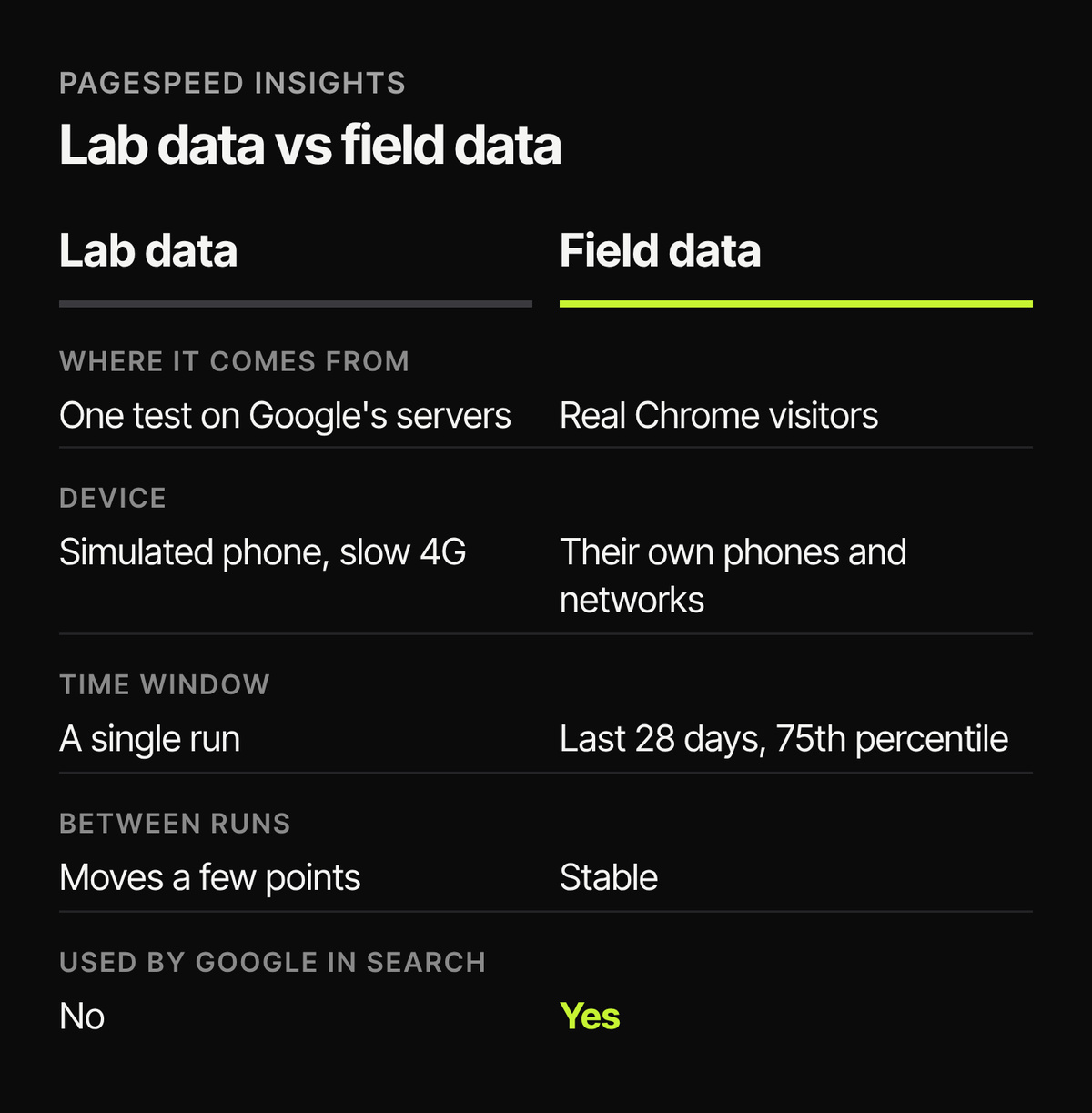
PageSpeed Insights shows two kinds of results. The first part, when your store has enough visitors, is field data: how real Chrome users experienced the page over the last 28 days. The part with the big score is lab data: a single test run on Google's servers.
Field data is what Google uses for search. Lab data is what helps you find the cause of a problem. A new or small store often has no field data at all. lviotech.com is new and doesn't have any yet, so for our own site the lab score is the only number we can see for now.
The three numbers that matter
- LCP (Largest Contentful Paint): how long until the main image or heading appears. Good is 2.5 seconds or less.
- INP (Interaction to Next Paint): how quickly the page reacts when someone taps or clicks. Good is 200 ms or less.
- CLS (Cumulative Layout Shift): how much the page jumps around while it loads. Good is 0.1 or less.
Each one is judged at the 75th percentile, so roughly three out of four visits need to hit the target. If all three are green in the field data, a lab score of 60 is not an emergency.
Shopify's speed report vs PageSpeed Insights
Shopify used to show a single speed score in the admin, built from Lighthouse. That has been replaced by a web performance summary on the Themes page (Online Store, then Themes), with the full reports under Analytics, then Reports. It shows the same three Core Web Vitals, from real visitors over the past 30 days, at the 75th percentile.
When that report and PageSpeed Insights disagree, it's usually because they look at different visitors over different time windows. Shopify also notes that a new store, or one that isn't open to the public yet, may have no metrics at all.
Test the pages that sell
Most people only test the home page. Run it on a product page and a collection page as well, on mobile. Those pages usually carry more apps, images and scripts than the home page does. If the product page is the slow one, these seven things are where we look first, and on older stores leftover app code is often part of the problem.
Run it more than once
Because the lab score changes between runs, run it three times and look at the middle result. When we audited our own site in November 2026, one blog post scored anywhere from 86 to 95 on mobile across three runs, with nothing changed on the page. When you compare before and after a change, use the same page and the same device setting.
What a real improvement looks like
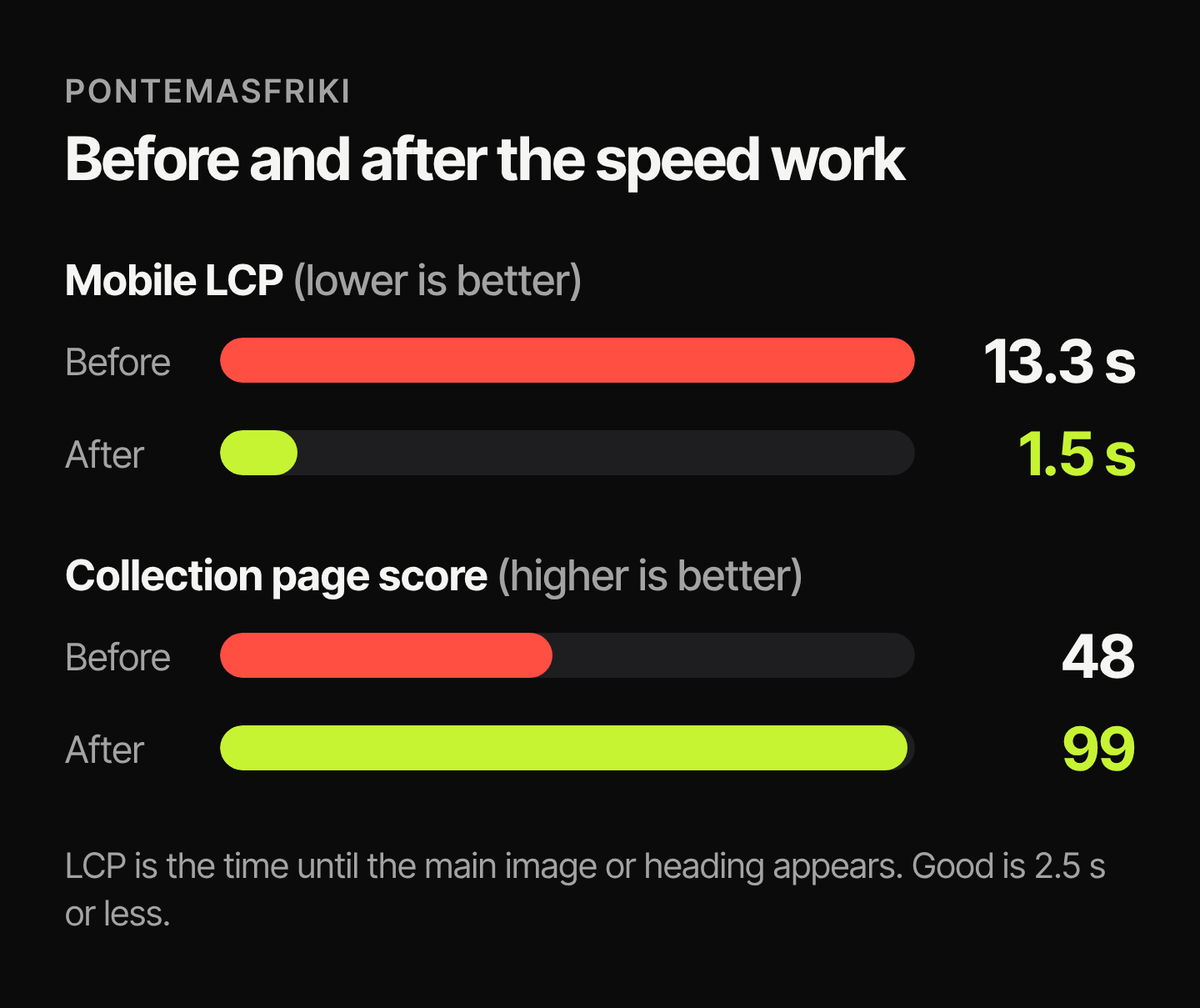
On Pontemasfriki, a store we did speed work for, mobile LCP went from 13.3 seconds to 1.5 seconds, and the collection page score went from 48 to 99. The 99 is the number that looks good in a report. The LCP change is the part shoppers feel: the main image shows up in about a second and a half instead of thirteen.
What the score won't tell you
A store can score well and still feel slow if the add to cart button takes a second to respond or a popup covers half the screen. Open the store on your own phone, on mobile data, and try to buy something. It's less precise than PageSpeed, but it's the test your customers run every day.
Quick answers
Is 50 a bad speed score for a Shopify store?
On mobile, not necessarily. Check the field data first. If LCP, INP and CLS are green, the score is mostly describing a simulated slow phone on a slow network.
Does the PageSpeed score affect Google rankings?
Not directly. Google's ranking systems use Core Web Vitals from real Chrome users, which is the field data. The lab score itself isn't used. Speed is also one signal among many, and relevant content still matters more.
Can a Shopify store score 100?
On desktop, yes. Our contact page does. On mobile it's possible on a simple page, but I think it's rarely worth the cost on a store with real apps running.
If you want someone to measure your store and fix what the score points to, see our Shopify speed optimization service.
Thresholds checked against Google's Lighthouse and Core Web Vitals documentation and Shopify's Help Center in November 2026.


